


TomTom GO Expert: Truck GPS
3.63.56K Reviews
App Specs
- Version
- 3.6.324
- Updated On
- License
- Free
- Downloads
- 10,000,000+
- Developer
- TomTom International BV
- Categories
- Maps & Navigation
- Platform
- Android, iOS
Screenshots
 Analysis by AppCompare
For a truck driver, a navigation app has to do more than point toward a destination: it needs to help make a route workable for the vehicle and keep useful information within reach as conditions change. That is the practical appeal I see in TomTom GO Expert: Truck GPS. It is a free maps and navigation app from TomTom International BV, aimed especially at people who plan around a truck’s size and needs. It has a 3.6 average from around 270,000 ratings and more than 10 million installs, so it is clearly used by a substantial audience, though those figures alone cannot tell you whether its routing suits your particular vehicle or region.
Why truck routing changes the decision
Ordinary navigation apps are often convenient for everyday driving, but the shortest route on a phone map is not automatically a suitable one for a truck. Vehicle dimensions, weight and load type can affect which roads make sense. The attraction here is the chance to set those details and have routing take them into account, rather than treating a truck as if it were a small car. I would regard that profile as a starting point for route planning, not a substitute for paying attention to road signs, temporary restrictions or local instructions.
That distinction matters in real work. A delivery driver heading to several addresses may value a route that considers the vehicle before the day’s stops begin, while someone driving a car across town may find the extra truck-oriented setup unnecessary. The app’s multi-stop planning is particularly relevant when a day involves more than one delivery: the useful question is not just how to reach the next address, but how to organize a sequence without repeatedly rebuilding the plan. I would still check the order and destination details before setting off, especially when a customer entrance is different from the address a map normally recognizes.
Planning for changing road conditions
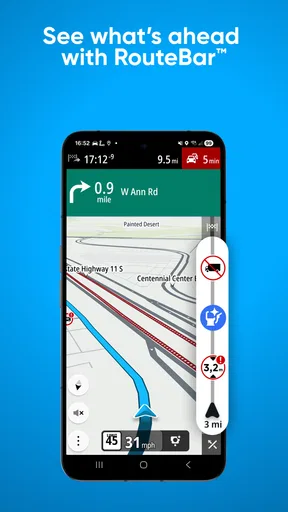
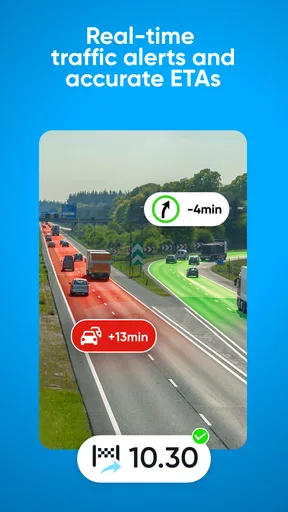
Traffic information can make the biggest difference when a route is already constrained. If congestion develops, an alternative that remains appropriate for the truck is more valuable than a quick detour that creates a different problem. In practice, I would use traffic updates to inform a decision rather than follow every suggested change automatically. A familiar driver may know that a road is routinely slow but still preferable to a narrow diversion, and a map cannot replace that judgement.
Connectivity is part of this experience. Traffic information is most useful when the phone can receive current updates, so I would plan around having a reliable mobile connection during the journey. A weak signal can make live information less dependable at exactly the point where a last-minute change seems tempting. Before driving into a patchy-coverage area, it is sensible to review the broad route and key turns while the connection is good. That simple habit gives you a better mental picture if the screen stops receiving fresh information.
Stops are part of a truck route
Truck-focused points of interest make the app more practical than a route line alone. Finding a suitable place to refuel, take a break or handle a vehicle-related stop is part of planning a working day, not an optional extra. I would check nearby options before I need them, rather than wait until fuel or time pressure turns the search into a distraction. A point shown on a map is still a candidate to assess: access, opening conditions and whether it suits the particular vehicle are worth considering before committing to a turn.
This is also where multi-stop planning can help beyond delivery addresses. A driver can think through the day as a chain of destinations, including necessary pauses, instead of treating every stop as a separate navigation session. The trade-off is that a carefully prepared plan still needs adjustment when a customer changes a time or a road becomes congested. I find that the app is most useful when it supports a driver’s plan, rather than being expected to make every operational decision by itself.
Worth Reading Before You Choose

EA SPORTS FC Mobile 26 Is a Bigger Football Game, but It Takes Time

Flipboard Shows What News Apps Must Do Beyond the Feed

Switching to Android Auto Means Rethinking Your Driving Routine

Google Calendar Makes a Crowded Week Easier to Manage

Ludo King Makes the Most of the Minutes Between Plans

Baby Panda World Brings Quick Play to Modern Phones, but Its Game Library Feels Busy
Using it comfortably on the move
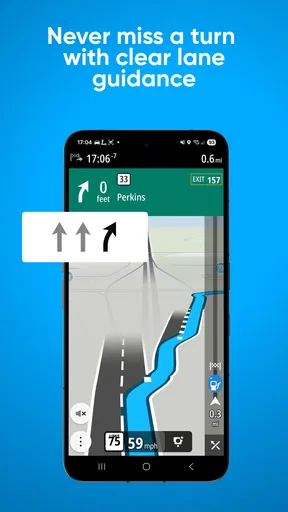
Clear voice guidance and readable map visuals matter more in a large vehicle than they might during a short walk or a familiar car trip. Lane guidance can help reduce the stress of approaching a complex junction, where discovering the right lane late can be awkward. I would set the route before moving and let spoken directions do most of the work, using the display for a quick glance when it is safe. No navigation app is worth taking your attention away from the road.
The app is free to download and is rated for Everyone. It offers in-app purchases ranging from $1.99 to $129.99 per item, so I would check the purchase details in the app before assuming which options are included at no cost. Its current version is 3.6.292-beta, and it requires Android 7.0 or later on Android devices. The release date was March 24, 2015. These details are useful when deciding whether a device can run it and when considering that a beta-labelled build may not feel as settled as a mature release. The rating and large install base offer context, but neither guarantees a smooth experience on every phone.
Getting Started with TomTom GO Expert
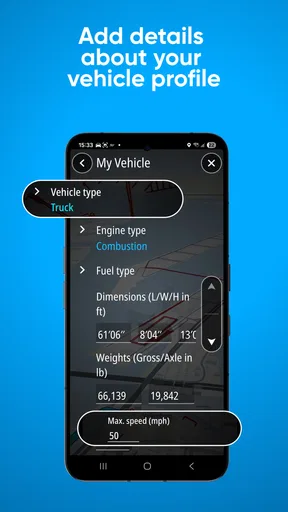
First things first, downloading the TomTom GO Expert: Truck GPS app is a breeze. Available on both Android and iOS, it’s just a few taps away. Once installed, setting it up is pretty straightforward. The app greets you with a clean and intuitive interface, which is always a good sign. You can enter your vehicle's dimensions, weight, and load type, ensuring the routes are tailored to your specific needs.
Features that Stand Out
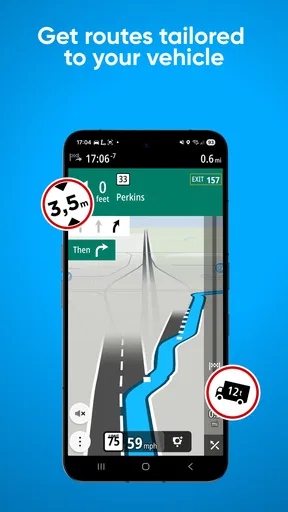
One of the standout features of this app is its ability to provide customized routes based on your vehicle’s specifications. This is crucial for truck drivers who need to avoid low bridges or narrow roads. The app also offers real-time traffic updates, which means you can dodge those pesky traffic jams and save precious time.
Another cool feature is the Points of Interest (POI) tailored for truckers. It includes rest areas, gas stations, and even truck washes. Trust me, when you’re on the road for hours, knowing where to find a good spot to refuel or grab a bite is invaluable.
Navigation Experience
The navigation experience with TomTom GO Expert is smooth and precise. The voice guidance is clear, and the map visuals are easy on the eyes. I particularly appreciate the lane guidance feature, which makes highway driving less stressful. No more last-minute lane changes, thank you very much!
The app also keeps you updated on speed limits, which is super handy. We all know how easy it is to lose track of speed on an open road. Plus, the speed camera alerts are a nice touch, helping you avoid those unwanted tickets.
What Could Be Improved?
As much as I love this app, no app is perfect. One thing I noticed is that the battery consumption can be a bit high when the app is running continuously. It’s best to have your phone plugged into a charger, especially on long trips.
Additionally, while the app covers a wide range of regions, there are still some remote areas where the map details could be improved. But honestly, that’s a minor hiccup considering the overall functionality.
Where it fits among navigation choices
Compared with a standard phone map, the main reason to choose this app is the truck-specific approach: vehicle details and truck-oriented points of interest are more relevant than a car-first route when the vehicle has meaningful size or weight constraints. A general navigation app may be quicker to open for a familiar drive or a simple passenger-car commute, and its everyday interface may feel more natural if you do not need truck planning. For a professional route, though, convenience should not be the only measure. I would rather spend a little longer setting up the vehicle profile than trust a route that has not been planned with those constraints in mind.
It is also worth separating route guidance from operational certainty. A map can guide you toward a destination, but a driver still needs to confirm that a site entrance, loading area or parking option is usable for the vehicle on that day. For an unfamiliar delivery, I would review the final approach before departure and keep the customer’s directions handy. That is not a weakness unique to this app; it is a sensible safeguard whenever a digital map cannot know every temporary condition at a destination.
A workable routine for a full driving day
Imagine starting with two deliveries on opposite sides of a city, followed by a fuel stop before a longer stretch of road. I would enter the vehicle details, add the destinations in the intended order, then check the route and likely stop options while parked and connected. If traffic later changes the timing, I would look at the suggested route with the truck’s needs in mind rather than accepting a detour on reflex. Once underway, voice prompts and lane guidance can handle routine decisions, leaving the screen for brief checks at safe moments.
That workflow also answers a common practical question: should you plan every stop in advance? I would plan the fixed commitments and identify useful possibilities, but leave room for the day to change. A stop that looks convenient on a map may not fit a revised schedule, and traffic can alter when it makes sense to pause. Treating points of interest as options instead of promises makes them more useful and avoids building a rigid itinerary around details that may shift.
Another helpful habit is to verify the vehicle profile before a different truck or load is used. A route tailored to yesterday’s setup may not suit today’s dimensions or weight. The extra check is easy to overlook when drivers share a phone or vehicle, yet it is more important than repeatedly zooming in on the map. If the profile does not match the vehicle, the central advantage of truck-aware routing is weakened from the outset.
When the connection is unreliable
Because live traffic depends on receiving current information, I would avoid making an urgent route decision based only on an update that has not refreshed. When reception becomes unreliable, use the guidance already visible as a reference, rely on road signs and your own judgement, and wait for a safer opportunity to reassess. Do not handle the phone while driving to troubleshoot a signal problem. If connectivity returns, check whether the route has changed before following a new instruction, particularly if it would send a large vehicle onto unfamiliar roads.
For data-conscious use, the practical approach is to reserve active navigation for the journey and avoid unnecessary screen interaction. I would also check the app’s purchase prompts and the phone’s own data and battery controls before a long shift, rather than assume every setting behaves the same on every device. A plugged-in phone helps with the battery drain I noticed, but it does not remove the need to position the device securely and keep the display from becoming a distraction. The app’s value is in reducing uncertainty, not in demanding constant attention.
Who should choose it—and who may not need it
I would recommend trying it if you regularly drive a truck, need routes shaped around vehicle specifications, or make several work-related stops in a day. Those are situations where its focus is more than a label: the combination of truck routing, traffic information and relevant places can support a repeatable planning routine. It may also suit an occasional large-vehicle driver who wants more than a conventional car route, provided they are willing to enter the correct vehicle details and review the route carefully.
I would skip it if you mainly need simple directions for a car, dislike configuring a vehicle profile, or expect a navigation app to settle every question about access at a delivery site. A general map may be less work for casual trips. Drivers who depend on uninterrupted live traffic should also consider whether their normal routes have dependable mobile coverage; when they do not, the app’s connected information is less helpful. In that situation, preparation and independent route awareness matter more than any live update.
Final Thoughts
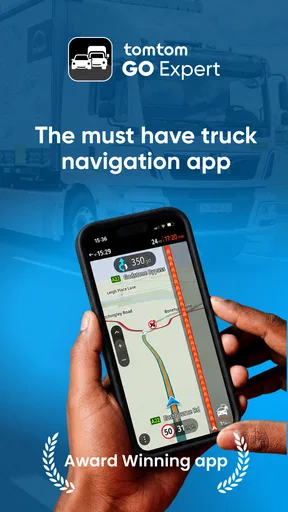
In summary, the TomTom GO Expert: Truck GPS is a robust tool for anyone who spends a lot of time behind the wheel. It’s packed with features that cater specifically to truck drivers, yet it’s simple enough for anyone to use. The real-time updates and customized routing make it a standout choice in the navigation app market.
So, if you’re looking to enhance your driving experience, give this app a spin. You might just find it to be the reliable road companion you’ve been searching for.
My overall view is that its strongest case is a driver who treats navigation as part of a broader plan: confirm the vehicle profile, prepare the important stops, use traffic information when it is current, and keep a sensible backup in mind when reception is poor. That is more deliberate than simply tapping a destination in a general map, but it is also what makes a truck-specific tool worthwhile. If that matches your working day, I think it deserves a trial; if your needs are occasional and uncomplicated, a standard navigation app may be the easier fit.
Pros
- Accurate truck-specific routes
- Real-time traffic updates
- Customizable vehicle profiles
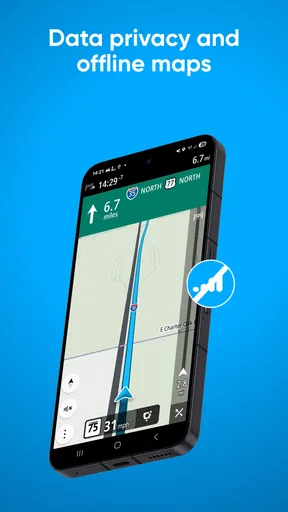
- Offline maps available
- Multi-stop planning feature
Cons
- Requires premium subscription
- High battery consumption
- Occasional map glitches
- Limited in-app support
- Large app size
FAQs for TomTom GO Expert: Truck GPS
What features does TomTom GO Expert: Truck GPS offer for truck drivers?
TomTom GO Expert: Truck GPS is designed specifically for truck drivers, providing features such as custom truck routing based on vehicle size, weight, and cargo type. It also offers real-time traffic updates, speed camera alerts, and offline maps. Additionally, drivers can benefit from Points of Interest tailored to truckers, such as rest stops and fuel stations.
How does TomTom GO Expert ensure accurate navigation for trucks?
The app uses advanced algorithms to calculate routes that take into account truck-specific restrictions like height, weight, and hazardous materials. TomTom regularly updates its maps to reflect changes in road conditions and regulations, ensuring drivers receive the most accurate navigation possible. This focus on precision helps prevent costly delays and detours.
Is TomTom GO Expert: Truck GPS compatible with both Android and iOS devices?
Yes, TomTom GO Expert: Truck GPS is available for both Android and iOS devices. The app can be downloaded from the Google Play Store for Android users and the Apple App Store for iOS users. This cross-platform availability allows for a wide range of compatibility with different smartphones and tablets.
Does TomTom GO Expert require an internet connection to function?
While TomTom GO Expert offers real-time traffic updates that require an internet connection, the app also provides offline maps. These maps can be downloaded in advance, allowing drivers to navigate without an internet connection. This feature is particularly useful in areas with poor signal coverage, ensuring continuous navigation support.
Can TomTom GO Expert: Truck GPS be customized for different types of trucks?
Yes, the app allows users to input specific truck dimensions, weight, and cargo details to optimize routing. This customization ensures that the route suggestions comply with road restrictions and legal requirements relevant to the truck’s profile. This personalized approach enhances safety and efficiency for truck drivers on the road.


